Ocoya Review 2026: AI Social Scheduling, Pricing & Limits

Ocoya Review 2026: AI Social Scheduling, Pricing, and Real Limits
Ocoya is an AI-powered social media management platform that promises to replace a chunk of your content workflow: captions, hashtags, design, scheduling, and publishing across Facebook, Instagram, X/Twitter, LinkedIn, Pinterest, TikTok, Threads, Google Business, YouTube Shorts, Discord, Telegram, Slack, and Canva. It is aimed at businesses, agencies, and freelancers who want one hub instead of five tools.
The pitch is strong. The reality, based on third-party review platforms, is more mixed than the marketing suggests. This review separates what Ocoya does well from where it breaks down, so you can decide whether it belongs in your stack.
What Ocoya actually does
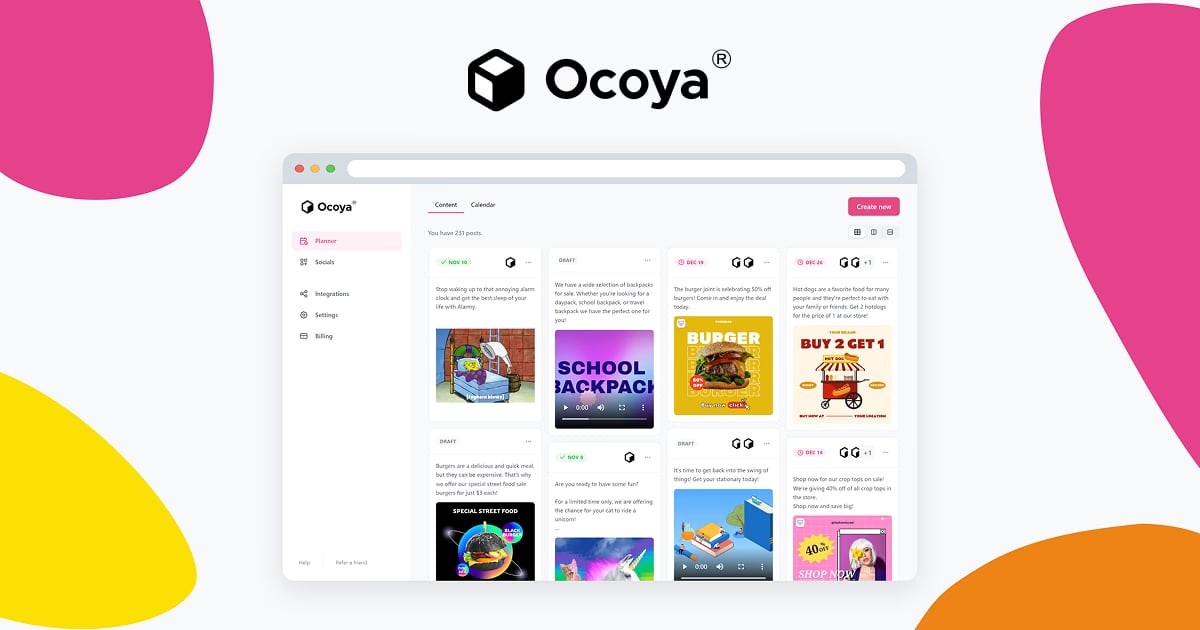
Ocoya product interface.
Ocoya combines three layers in one dashboard:
- AI content generation. AI agents and workflows generate captions, hashtags, and post variations in bulk. This is the core differentiator versus older schedulers.
- In-house editor and templates. A built-in design editor with social templates, plus a media library, so you can produce visuals without leaving the platform.
- Scheduling and publishing. Drag-and-drop scheduling, best-time posting suggestions, collaboration tools, and support for the long list of networks above.
Ocoya also claims the ability to schedule up to 1,000 posts per minute, which is a scalability signal aimed at agencies and high-volume publishers. There is a 7-day free trial, tiered pricing from $15/month (Bronze) to $159/month (Diamond), an enterprise plan, and an affiliate program with 30% recurring commission.
Ideal users and use cases

Ocoya product interface.
Ocoya fits best when content volume, not analytics depth, is your bottleneck.
Good fits:
- Solo creators and small teams that need captions and hashtags generated quickly.
- Agencies managing many client accounts who want bulk creation and a shared media library.
- Businesses that post across many networks, including less common ones like Discord, Telegram, and Google Business.
- Teams that already design in Canva and want scheduling plus AI copy in the same workflow.
Weaker fits:
- Teams whose primary need is reporting, social listening, or ad management. Ocoya is not a listening tool; if that is your priority, a dedicated platform like Keyhole is a better starting point.
- Organizations that require strict approval chains and audit trails before publishing. A workflow-first tool such as Ordinal is built around that need.
- Anyone whose business depends on publishing reliability above all else. See the limitations section below.
Strengths, based on user feedback
Across review platforms, the recurring positives are consistent:
- Ease of use and all-in-one functionality. Reviewers on G2 repeatedly praise Ocoya for letting them create, schedule, and manage social content in one place rather than stitching tools together. See the G2 review page for the current sample.
- Breadth of integrations. The network list is wider than most competitors at this price point, covering mainstream platforms plus community channels like Discord and Telegram.
- AI-assisted output at volume. Bulk caption and hashtag generation is the feature users cite most when explaining why they chose Ocoya over a plain scheduler.
- Price accessibility. Entry pricing around $15/month undercuts many established schedulers, which matters for freelancers and early-stage agencies.
Limitations and red flags
This is where an honest Ocoya review has to slow down. The aggregate ratings are not terrible — AppSumo shows roughly 4.07 out of 5 across 330 verified reviews — but the negative reviews describe a specific, repeated failure pattern rather than random complaints. You can read them directly on the AppSumo review page and on Trustpilot.
The recurring issues:
- Publishing reliability. Multiple reviewers report that scheduled posts simply do not go out, or that only some of a batch publishes. One reviewer described scheduling several posts and having only one publish as planned. Another reported the publish button staying grayed out on drafts.
- Account reconnection loops. The standard support response — sign out, sign back in, reconnect the account — is described by several users as ineffective, with glitches returning after reconnection.
- Support responsiveness. A frequent complaint is slow or dismissive support, including cases where users reported being stuck for days without a working publish path.
- Product momentum concerns. Some reviewers point to quiet update channels and question whether development is keeping pace with the roadmap.
To be fair: review platforms skew negative, because satisfied users rarely return to post. Some of these reports are from lifetime-deal buyers on older plans, and individual experiences vary by network and account type. But the pattern is specific enough — scheduling failures plus support friction — that it deserves weight in your decision.
Pricing signals and what to verify
Ocoya publishes tiered plans from $15/month (Bronze) to $159/month (Diamond), plus an enterprise tier, with a 7-day free trial. Treat these as signals, not fixed facts: AI tool pricing changes often, and per-seat or per-account limits are the numbers that actually determine your real cost.
Before you commit, verify:
- How many social accounts and users each tier includes.
- Whether AI generation credits are capped, and what happens when you hit the cap.
- Whether the networks you actually publish to are supported at your tier.
- What the cancellation and refund process looks like.
- Whether the 7-day trial is enough time to test publishing on every network you rely on.
If budget is the deciding factor, it is worth comparing Ocoya against SocialPilot, which competes on similar ground with a longer track record, and Metricool, which bundles analytics and ad management alongside scheduling.
Setup: what to expect
Setup follows the standard social management pattern:
- Create your account and start the 7-day trial.
- Connect each social profile through the platform's authorization flow.
- Build or import brand assets into the media library.
- Create a first post using AI generation, then edit the caption and visual in the built-in editor.
- Schedule it, and — critically — confirm it actually published at the scheduled time before scaling up.
That last step matters more with Ocoya than with most tools. Do not migrate your entire content calendar in week one. Run a two-week parallel test: schedule real posts through Ocoya while keeping your existing tool active, then compare what published versus what did not. If reliability holds across your networks, expand. If it does not, you have lost nothing.
How Ocoya compares to alternatives

Ocoya product interface.
| Tool | Best for | Watch out for |
|---|---|---|
| Ocoya | AI-generated captions and hashtags at volume, wide network coverage, low entry price | Publishing reliability and support reports; lighter analytics |
| SocialPilot | Teams wanting a mature scheduler with solid analytics | Less aggressive AI content generation |
| Metricool | Analytics, ad management, and scheduling in one | Different AI and design workflow than Ocoya |
| Sendible | Agencies needing workspaces and white-label options | Higher cost structure as you scale |
| RecurPost | Evergreen content libraries and recurring queues | Narrower AI and design features |
If your core need is evergreen recycling, RecurPost is the more natural fit. If you need agency-grade client separation and branding, Sendible is the stronger comparison. Ocoya's edge is specifically the AI-first creation layer combined with broad network support.
Decision criteria: should you choose Ocoya?

Ocoya product interface.
Choose Ocoya if:
- Your bottleneck is producing captions, hashtags, and post variations at volume.
- You publish to many networks, including community platforms.
- You want design, AI copy, and scheduling in one subscription.
- You can tolerate some operational risk and will verify publishing behavior yourself.
Skip Ocoya if:
- A missed post has real business consequences for you.
- You need responsive support with clear escalation paths.
- Reporting, listening, or ad management is central to your workflow.
- You require formal approval workflows and audit trails.
A reasonable middle path: use the 7-day trial for a live reliability test on your most important network, and keep a backup scheduler configured. That way you get the AI productivity upside without betting your publishing calendar on an unverified assumption.
Related reading
- Constant Contact Review 2026: Features, Pricing & Who It Fits - Evidence-based Constant Contact review for 2026: email and SMS features, pricing signals, setup, limitations, and who should choose it.
Sources and further reading
- Ocoya Reviews 2026: Verified Ratings, Pros & Cons | AppSumo - Ocoya is rated 4.07 out of 5 based on reviews from 330 verified users. Explore helpful comments, compare pros and cons, and find out how Ocoya works for a business like yours.
FAQ
Is Ocoya legit? Yes — it is a real platform with thousands of customers and an active review presence on G2, AppSumo, and Trustpilot. The question is not legitimacy but reliability, and reviews show mixed results on publishing.
How much does Ocoya cost? Published tiers run from around $15/month (Bronze) to $159/month (Diamond), with an enterprise plan and a 7-day free trial. Confirm current limits before buying, since AI tool pricing shifts.
Does Ocoya have a free trial? Yes, a 7-day free trial is offered. Use it to test actual publishing on your key networks, not just the editor.
What are the best Ocoya alternatives? SocialPilot and Metricool for scheduling and analytics, Sendible for agency workspaces, and RecurPost for evergreen recycling. The right choice depends on whether AI generation or reliability matters more to you.
Can Ocoya replace a social media agency? It can reduce the content production workload significantly through AI generation and bulk scheduling. It does not replace strategy, community management, or the judgment calls that drive engagement.
Conclusion
Ocoya is a genuinely interesting AI-first social media tool with broad integrations and accessible pricing. Its AI caption and hashtag generation, built-in editor, and wide network coverage make it attractive for creators and agencies drowning in content production.
But an evidence-based review has to name the trade-off: third-party reviews repeatedly describe publishing failures and support friction, and those are the two things you cannot work around in a scheduling tool. The smart approach is not to dismiss Ocoya or to trust the marketing — it is to run a short, controlled reliability test on your own accounts before you depend on it. If it publishes reliably for you, the AI layer is a real productivity gain. If it does not, you will know within two weeks, and you can move to a more established scheduler without disrupting your calendar.