RecurPost Review 2026: Features, Pricing & Who It Fits

RecurPost Review 2026: Features, Pricing, and Who It Fits
If you manage social media for multiple clients or locations, you already know the pain: logging into each account, re-sharing old content, and hoping nothing fails to publish. RecurPost is built specifically for that scenario. This review breaks down what it does well, where it falls short, and whether it deserves a spot in your stack.
What Is RecurPost?

RecurPost product interface.
RecurPost is a social media management and scheduling platform designed for agencies, freelancers, small businesses, and multi-location brands that juggle many accounts. It lets you plan, approve, schedule, publish, and measure posts across 10 social networks from a single workspace — without sharing client passwords.
Unlike tools built around a single brand, RecurPost leans into multi-account workflows. Its core features include evergreen content libraries, recurring queues, best-time scheduling, AI hashtag suggestions, a unified inbox, and approval workflows.
The pitch is simple: reduce manual effort and prevent publishing errors when you are responsible for more than one feed.
Key Features That Matter
Evergreen Content Libraries
This is RecurPost's signature feature. You save posts into libraries, and the tool automatically recycles them into your schedule. For anyone who has manually re-shared the same blog post or tip every few weeks, this alone can save hours.
Recurring Queues
Instead of scheduling each post individually, you build queues that repeat on a cadence you define. You can set different queues for different accounts, which is useful when a client wants weekly tips but another wants daily promotions.
Best-Time Scheduling
RecurPost suggests optimal posting times based on when your audience is active. It is not a magic bullet, but it removes the guesswork for teams that do not have a dedicated analyst.
AI Hashtag Suggestions
When you draft a post, RecurPost can suggest relevant hashtags. This is a convenience feature rather than a strategy replacement — you still need to know your niche.
Unified Inbox
You can view and respond to comments and messages from multiple accounts in one place. For agencies, this reduces the number of tabs open at any given time.
Approval Workflows
If you work with clients or stakeholders, you can route posts for approval before they go live. This is one of the features that separates RecurPost from simpler schedulers.
Who Is RecurPost For?
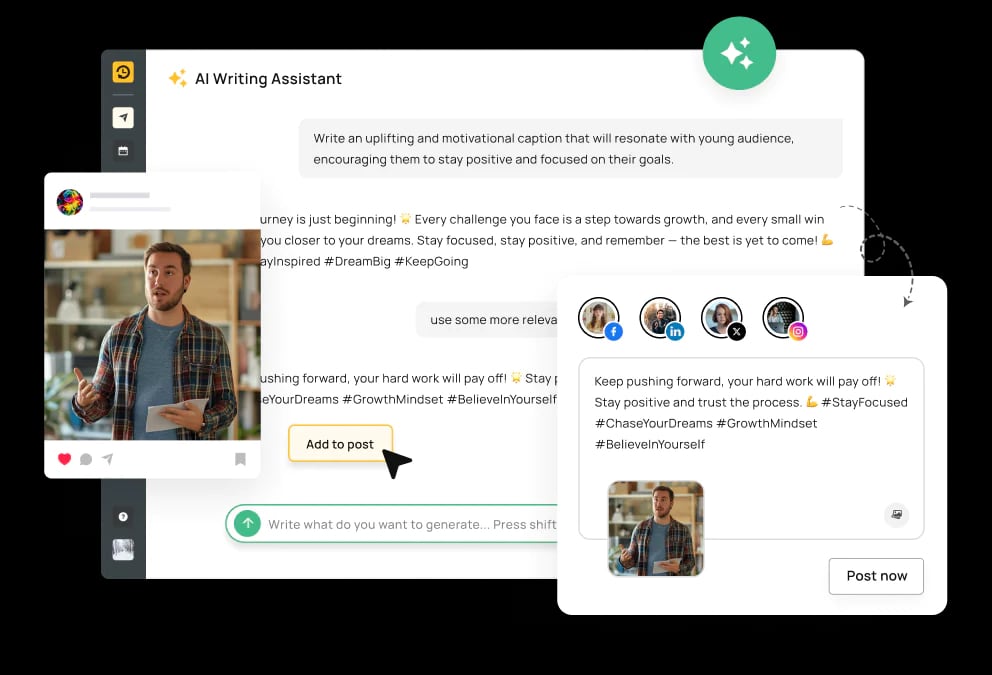
RecurPost product interface.
RecurPost is not trying to be everything to everyone. It fits best when you answer yes to at least one of these:
- You manage social media for multiple clients as an agency or freelancer.
- You run a multi-location brand where each location has its own account.
- You want to recycle evergreen content without manual effort.
- You need client approvals without email chains.
If you only manage one personal account and post occasionally, a simpler tool may be enough.
Use Cases and Practical Examples

RecurPost Review 2026: Features, Pricing & Who It Fits - Use Cases and Practical Examples.
Agency Managing 10 Client Accounts
An agency can create a separate library for each client, set recurring queues for weekly tips, and use approval workflows so clients sign off before publishing. No more sharing passwords or chasing emails.
Multi-Location Restaurant Chain
Each location gets its own queue for daily specials, while a central library holds brand-wide content. The marketing team schedules once and lets RecurPost handle the rest.
Freelancer with Recurring Content
A freelancer can batch-create a month of posts, drop them into an evergreen library, and let RecurPost recycle them. This frees up time for client work.
Strengths and Limitations
What Users Praise
Reviews on G2 and Capterra consistently highlight ease of use and responsive customer support. One Capterra reviewer noted that RecurPost saved them hours each week compared to manual scheduling. Trustpilot shows a 4-star rating from a small sample of users.
Where It Falls Short
- Analytics depth: Reporting is functional but not as deep as dedicated analytics platforms. If you need granular attribution, you may need to export data.
- Learning curve: The evergreen library concept is powerful but takes some getting used to. New users may need a few sessions to set up queues correctly.
- Network support: 10 networks covers most needs, but if you rely on a niche platform, check compatibility first.
Pricing Signals
RecurPost starts at $9/month, which makes it one of the more affordable options for multi-account management. There is a 14-day free trial, so you can test the workflow before committing. Pricing tiers typically scale with the number of social profiles and users, so agencies should estimate based on client count.
For comparison, tools like Loomly and Planable offer different strengths — Loomly leans into calendar-first planning, while Planable focuses on collaboration. If you need AI-driven scheduling, Wahlu is worth a look.
Setup and Getting Started
- Connect your accounts. RecurPost supports 10 networks. You authorize each account without sharing passwords.
- Create libraries. Group content by client, campaign, or theme.
- Build queues. Assign libraries to queues and set posting times.
- Set approval rules. If you have clients, configure who needs to approve what.
- Invite team members. Assign roles and permissions.
The trial period is enough to run a small pilot with one or two clients.
Decision Criteria: Is RecurPost Right for You?
Ask yourself:
- Do I manage more than three social accounts? If yes, RecurPost's multi-account design is a strong fit.
- Do I recycle content regularly? If yes, the evergreen library is a major time-saver.
- Do I need client approvals? If yes, the workflow features justify the cost.
- Do I need deep analytics? If yes, you may need a supplementary tool.
If you are still comparing options, our Publer review covers another affordable scheduler with different strengths.
Related reading
- Zoho Assist Review 2026: Features, Pricing, and Who It Fits - Evidence-based Zoho Assist review covering features, pricing, setup, performance, limitations, and ideal users for IT teams, help desks, and MSPs.
FAQ
Is RecurPost good for agencies?
Yes. Its multi-account support, approval workflows, and evergreen libraries are built for agencies managing multiple clients.
How much does RecurPost cost?
Pricing starts at $9/month. Plans scale with the number of social profiles and users. A 14-day free trial is available.
Does RecurPost support Instagram and TikTok?
RecurPost supports 10 social networks. Check the official site for the current list, as supported platforms can change.
Can I schedule recurring posts?
Yes. Recurring queues and evergreen libraries are core features designed for exactly that.
Is there a free plan?
RecurPost offers a free trial rather than a permanent free plan. After the trial, you choose a paid tier.
Conclusion
RecurPost is a focused tool for a specific problem: managing many social accounts without losing your mind. Its evergreen libraries and recurring queues are genuinely useful for agencies and multi-location brands, and the $9/month starting price is accessible. It is not the deepest analytics platform, and the learning curve is real, but for teams that need to publish consistently across multiple accounts, it is a strong candidate.
If you want to see how it compares to other tools, read our Fedica review for a different take on multi-platform publishing.