OneUp Review 2026: Social Media Scheduling Tested

OneUp Review 2026: Social Media Scheduling Tested
OneUp is a social media scheduling and management platform that has been around since 2016. It claims over 130,000 users who have published more than 50 million posts. In this review, I'll break down what OneUp actually does, where it shines, where it falls short, and whether it's the right fit for your social media workflow.
What OneUp Does
OneUp product interface.
OneUp is an all-in-one social media tool. At its core, it lets you schedule and publish posts across a wide range of networks: Facebook, Instagram, TikTok, YouTube, Pinterest, LinkedIn, X (Twitter), Bluesky, Threads, Snapchat, Google Business Profiles, WhatsApp, Meta Ads, and Discord. That's an unusually broad list — most competitors stop at the big six or seven.
Beyond scheduling, OneUp includes:
- Analytics and reporting with customizable reports
- Social listening for brand monitoring
- Unified inbox for comments and DMs
- Post approvals for team collaboration
- AI-powered post writing
- API and MCP access for developers
It also offers free standalone tools like hashtag generators and caption generators for various platforms.
Who OneUp Is For
OneUp product interface.
OneUp targets individuals, creators, and small to midsize businesses. It's not an enterprise social suite like Sprinklr, and it's not a self-hosted solution like Mixpost. Instead, it sits in the same broad category as Buffer and SocialBu — affordable, cloud-based, and designed for ease of use.
If you manage a handful of accounts and want one dashboard to schedule, respond, and report, OneUp is built for you. If you're an agency with complex approval chains and dozens of client workspaces, you might find it lighter than dedicated agency tools like HeyOrca.
Key Features in Practice
Scheduling and Publishing
OneUp's scheduling is straightforward. You can create a post, pick your networks, and either publish immediately, schedule for a specific time, or set up recurring posts. Recurring posts are a standout — you can recycle evergreen content automatically, which is useful for keeping a consistent presence without manual effort.
The three-step setup process is genuinely simple: connect accounts, write or queue content, and schedule. There's no steep learning curve.
Analytics and Reporting
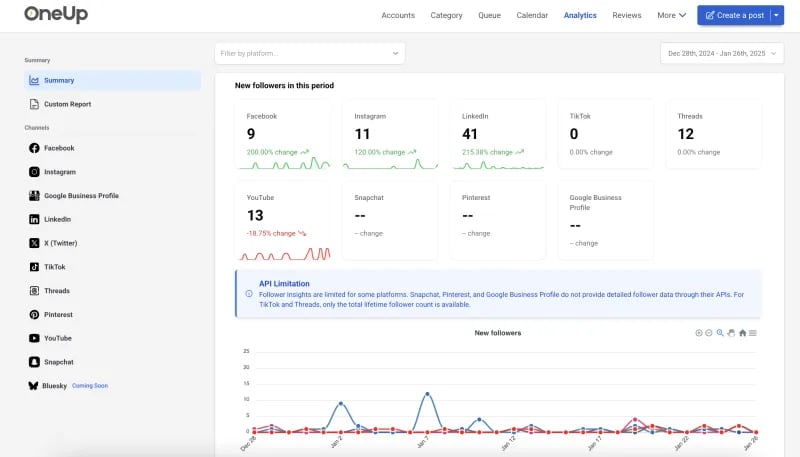
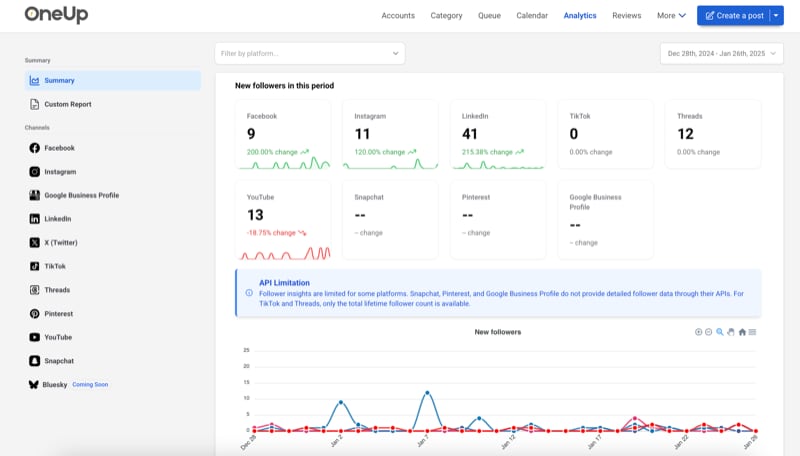
OneUp provides analytics across connected networks. You can build custom reports, which is helpful for client work or internal tracking. The depth of analytics varies by network — some platforms expose more data than others — but for most users, it covers the essentials: engagement, reach, and post performance.
Social Listening
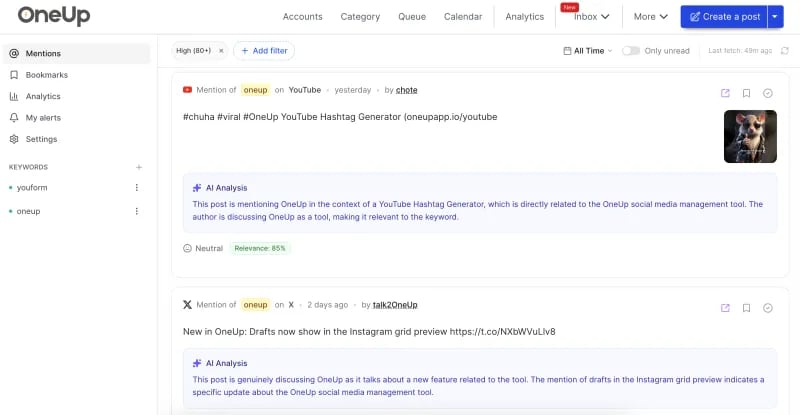
Social listening lets you monitor mentions, keywords, and brand-related conversations. It's not as deep as dedicated listening tools, but it's included in the platform, which adds value if you're already using OneUp for scheduling.
Unified Inbox
The unified inbox aggregates comments and DMs from connected accounts. This is a practical feature for community management — you can reply without switching between native apps.
Approvals and Collaboration
Post approvals allow teams to review and sign off on content before it goes live. This is useful for businesses with multiple stakeholders, though it's not as granular as some agency-focused tools.
AI Writing
OneUp includes AI-powered post writing. It can generate captions and content ideas, which speeds up drafting. The quality is decent for short-form social copy, but you'll still want to edit for brand voice.
API and MCP Access
For developers, OneUp offers API and MCP access. This opens up automation possibilities — you can connect OneUp to other tools or build custom workflows. It's a feature that Postiz also emphasizes, though Postiz leans more heavily into agentic scheduling.
Pricing Signals
OneUp doesn't publish a full public pricing table on its homepage, but the platform is positioned as affordable. It offers a free plan with limited features and paid tiers that scale with the number of social accounts and users. There's a friendly refund policy and you can cancel anytime.
Compared to enterprise tools, OneUp is significantly cheaper. Compared to free tools, you're paying for the convenience of a unified dashboard and advanced features like social listening and approvals.
Setup and Ease of Use
Setup is one of OneUp's strengths. The three-step process is quick, and the interface is clean. You can connect accounts via OAuth, and the dashboard is intuitive. Most users will be up and running within an hour.
That said, some networks have quirks. For example, Instagram and TikTok have specific posting requirements (e.g., business accounts, video formats). OneUp handles these, but you'll still need to understand each platform's rules.
Limitations and Considerations
No tool is perfect, and OneUp has trade-offs:
- Analytics depth: While customizable, the analytics aren't as deep as dedicated analytics platforms. If you need granular data, you might need to supplement.
- Social listening: It's basic compared to standalone listening tools. It's a bonus, not a replacement.
- Approvals: The approval workflow is simpler than agency-focused tools. If you need multi-stage approvals, look at HeyOrca.
- Platform coverage: While broad, some networks (like Discord and WhatsApp) are less commonly supported by competitors, so OneUp stands out here. But for very niche networks, support may be limited.
- API access: Available, but if you need a pure API-first solution, Upload-Post might be more suitable.
OneUp vs Alternatives
OneUp product interface.
| Tool | Best For | Key Difference |
|---|---|---|
| OneUp | All-in-one scheduling for individuals and SMBs | Broad network support, social listening, approvals |
| Buffer | Simplicity and brand recognition | Strong scheduling, lighter on listening |
| SocialBu | Automation and AI | More automation-focused |
| HeyOrca | Agencies | Visual calendar, client approvals |
| Mixpost | Self-hosted | Full control, no recurring SaaS fees |
| Postiz | Agentic scheduling | CLI for agents, 30+ networks |
| Upload-Post | API-first posting | Developer-focused |
| Sprinklr | Large enterprises | Unified-CXM, AI copilots |
Decision Criteria: Is OneUp Right for You?
Social Media Analytics Dashboard.
Choose OneUp if:
- You manage multiple social accounts and want one dashboard.
- You value ease of use and quick setup.
- You need social listening and a unified inbox without paying enterprise prices.
- You want recurring posts and AI writing assistance.
- You're a small team that needs basic approvals.
Look elsewhere if:
- You need deep analytics or enterprise-grade listening.
- You're an agency with complex approval workflows.
- You want a self-hosted solution (consider Mixpost).
- You need a pure API posting service (consider Upload-Post).
Related reading
- Shanghai Jungle Review 2026: China Market Entry Agency - Evidence-based Shanghai Jungle review: Tmall Global setup, Xiaohongshu campaigns, pricing signals, limitations, and which foreign brands it fits.
FAQ
Is OneUp free? OneUp offers a free plan with limited features. Paid plans unlock more accounts, users, and advanced features.
Does OneUp support Instagram and TikTok? Yes, OneUp supports scheduling and publishing to Instagram and TikTok, along with many other networks.
Can I try OneUp before buying? Yes, there's a free plan and a refund policy. You can cancel anytime.
Does OneUp have an API? Yes, OneUp offers API and MCP access for developers.
How does OneUp compare to Buffer? OneUp offers broader network coverage and includes social listening, while Buffer is known for simplicity and brand trust. See our Buffer review for details.
Conclusion
OneUp is a solid, affordable social media management tool that punches above its weight in network coverage and ease of use. It's not the deepest analytics or listening tool, and it's not built for complex agency workflows, but for individuals, creators, and small businesses, it covers the essentials well. If you want an all-in-one scheduler with a friendly learning curve, OneUp is worth a serious look.
External sources: