Zoho Assist Review 2026: Features, Pricing, and Who It Fits

Zoho Assist Review 2026: Features, Pricing, and Who It Fits
Zoho Assist is a cloud-based remote support and remote access platform aimed at IT professionals, help desks, and managed service providers. It promises quick setup, broad cross-platform coverage, and a feature set that scales from small teams to large enterprises. But how does it actually perform in daily use? This review examines Zoho Assist's strengths, weaknesses, pricing signals, and ideal use cases based on hands-on reports and user feedback.
What Is Zoho Assist?
Zoho Assist product interface.
Zoho Assist is a remote desktop and remote support tool that runs primarily through a web browser. It enables technicians to connect to Windows, Mac, Linux, iOS, Android, and Chromebook devices for attended (on-demand) and unattended remote access. The platform is part of the broader Zoho ecosystem and integrates with help desk tools like Zoho Desk and Spiceworks Cloud Help Desk, as well as communication platforms such as Microsoft Teams, Slack, and Google Workspace.
According to Zoho, the product has been installed over 850 million times and has facilitated more than 11 million remote sessions globally. While those numbers reflect scale, the real question is whether the tool fits your workflow.
Key Features and Capabilities
Zoho Assist product interface.
Cross-Platform Remote Access
Zoho Assist supports a wide range of operating systems:
- Windows: 7 and later, including Windows Server 2008 R2 and later
- macOS: 10.9 Mavericks and later
- Linux: including Raspberry Pi OS
- Android: 5.0 and later (full control on Samsung devices; screen view only on most others)
- iOS: 11 and later (screen view only)
- ChromeOS: 16 and later
You can initiate connections from a browser or from mobile apps, and a native Windows client is available for smoother performance.
Attended and Unattended Access
Zoho Assist separates its offerings into two main plan types: Remote Support (for on-demand sessions) and Unattended Access (for persistent access to machines). This split is important because many competitors bundle both capabilities into a single plan. With Zoho Assist, you may need two subscriptions if you require both ad-hoc support and unattended access.
Mobile Device Support
One standout feature is the ability to remotely access Android and iOS devices—something many competitors do not offer. On Samsung phones, you can fully control the device; on other Android and iOS devices, you can view the screen. This is useful for troubleshooting mobile app issues or guiding users through settings.
Cobrowse
Zoho Assist includes a Cobrowse feature that lets you remotely control a user's browser tab. The remote user installs a browser extension and grants access. This can be handy for web-based support, though it requires a separate Cobrowse plan (starting at $12 per technician per month, with unlimited free two-minute sessions).
Integrations
Zoho Assist integrates with:
- Zoho Desk
- Spiceworks Cloud Help Desk
- Microsoft Teams
- Slack
- Google Workspace
These integrations help embed remote support into existing help desk and communication workflows.
Performance and User Experience
In testing by PCMag, Zoho Assist worked reliably across platforms but felt laggier than competitors like RemotePC, Splashtop, and TeamViewer. Streaming video was noticeably choppy, and the overall experience felt more technical than user-friendly. The native Windows client offered somewhat smoother performance than the web app.
User reviews on Software Advice often praise reliability and ease of connecting to client devices, but some note that the interface could be more intuitive for non-technical users. The tool clearly caters to IT professionals rather than home users providing family tech support.
Pricing Signals
Zoho Assist offers a free version for personal or small-scale commercial use, but it has significant limitations: no file transfers, no unattended access, no voice chat, and mobile access capped at five sessions with a 15-minute limit per session. It's essentially a limited trial.
Paid plans are split into two tracks:
Remote Support Plans (per technician)
- Standard: $12/month – 2 concurrent sessions, file transfers, voice chat
- Professional: $18/month – 4 concurrent sessions, mobile device support
- Enterprise: $28/month – 6 concurrent sessions, remote printing, video chat, annotation tools
Unattended Access Plans (per technician)
- Standard: $12/month – unlimited access to up to 25 computers, file transfers, voice chat
- Professional: $18/month – adds mobile device support, remote printing, video chat
A 15-day free trial is available. Note that none of the Remote Support plans include unattended access, and none of the Unattended Access plans include on-demand support sessions. You'll need both if you require both capabilities.
Compared to competitors, Zoho Assist is competitively priced but not the cheapest. RemotePC starts at $2.95/month for a single computer, and TeamViewer's paid plans start at $24.90/month (billed annually). However, TeamViewer's free personal plan includes file transfers and unattended access, which Zoho Assist's free version does not.
Setup and Ease of Use
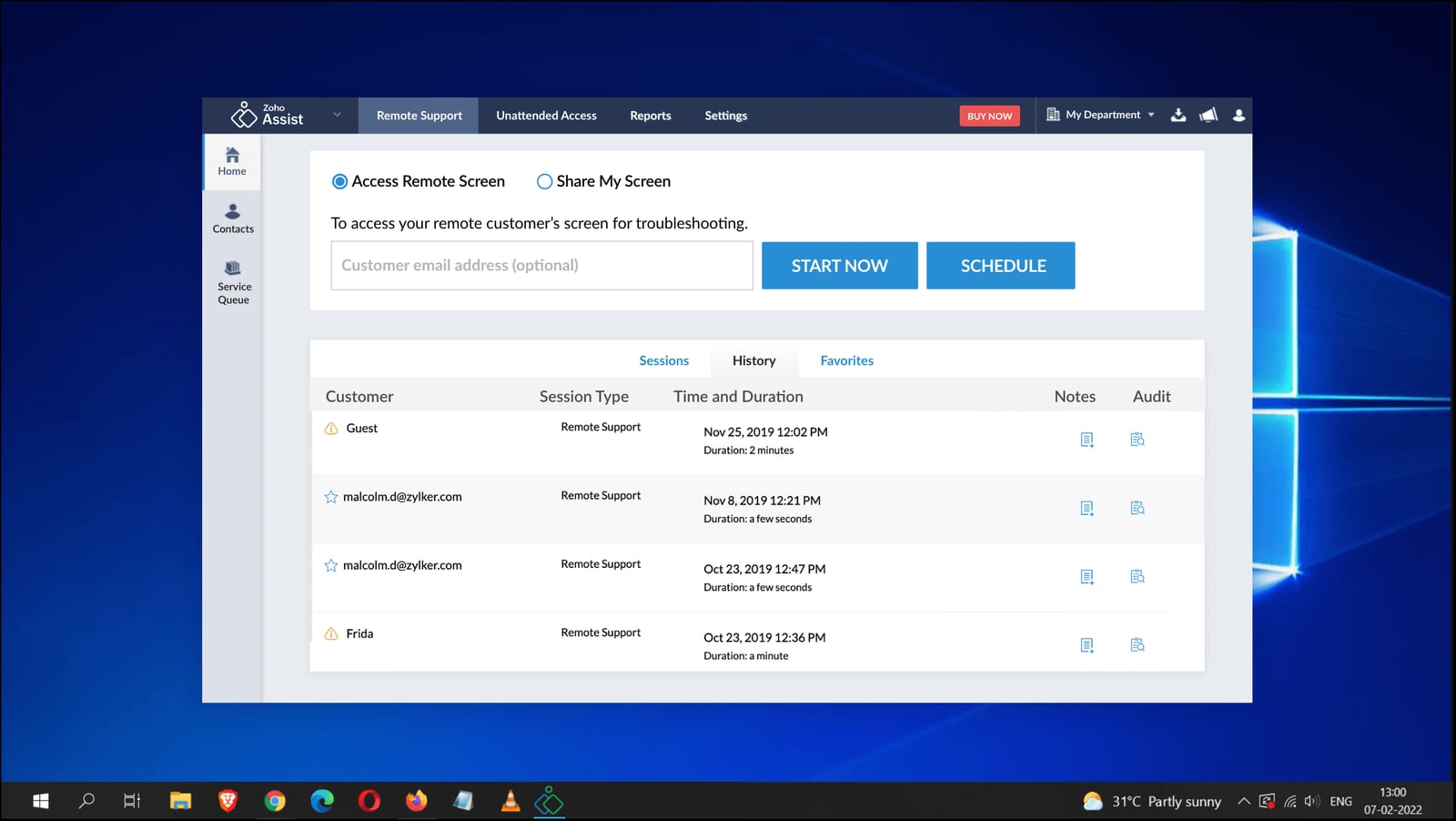
Getting started with Zoho Assist is straightforward. You sign up on the web, and the interface guides you through sending remote support requests or setting up unattended access. For attended support, the remote user visits a link, downloads a small program, runs it, and grants permission. For unattended access, you download an installer that configures the machine for persistent access.
Zoho Assist claims a 30-second setup, which is optimistic but reflects the lightweight nature of the connection process. The web-based nature means no complex installation for the technician, though the native Windows client requires activation in settings.
Strengths and Limitations
Strengths
- Broad cross-platform support, including mobile devices
- Competitive pricing, especially for basic remote support
- Free version available (with limitations)
- Integrates with popular help desk and communication tools
- Cobrowse feature for web-based support
- Scales from small teams to enterprise
Limitations
- Performance can be laggy compared to native-client competitors
- Interface feels technical and may not suit non-IT users
- Remote Support and Unattended Access are separate plans—costs add up
- Free version is very limited (no file transfer, no unattended access, session caps)
- Mobile control limited to Samsung devices; others are view-only
- Cobrowse requires an additional subscription
Who Is Zoho Assist For?

Zoho Assist product interface.
Zoho Assist is best suited for:
- IT help desks that need on-demand remote support for employees
- MSPs providing remote support to multiple clients
- Internal IT teams managing a fleet of computers and mobile devices
- Enterprises already using Zoho or other integrated tools
It is less ideal for:
- Individuals needing occasional remote access to a home computer (free alternatives may suffice)
- Teams requiring high-performance remote desktop for graphics-intensive work
- Users who want a single plan covering both attended and unattended access
Decision Criteria: Is Zoho Assist Right for You?

Zoho Assist product interface.
Consider Zoho Assist if:
- You need cross-platform support, especially for mobile devices
- You value integration with help desk and communication tools
- Your budget is moderate and you can tolerate occasional lag
- You primarily perform remote support, not high-performance remote work
Look elsewhere if:
- You need smooth, high-frame-rate remote desktop performance
- You want a single plan for both attended and unattended access
- You prefer a simpler, less technical interface
- You need robust free-tier features for personal use
For alternatives, you might explore RemotePC or TeamViewer, which are PCMag Editors' Choice winners. If you're evaluating other remote support tools, our Ayrshare review covers a different category—social media APIs—but may be useful if you also manage social workflows.
Related reading
- Fedica Review 2026: Features, Pricing, and Who It Fits - Evidence-based Fedica review: 15-platform publishing, audience analytics, bot detection, pricing signals, setup, and limitations for creators and agencies.
- Publer Review 2026: Features, Pricing, and Who It Fits - Evidence-based Publer review for 2026: supported networks, scheduling features, pricing signals, setup, limitations, and who should choose it.
- RobinReach Review 2026: AI Social Scheduling Tested - Evidence-based RobinReach review: AI scheduling via Claude and ChatGPT, multi-platform publishing, pricing signals, setup, limits, and who it fits in 2026.
Sources and further reading
- Zoho assist recent experience : r/sysadmin - Reddit - Feb 24, 2025 ... Zoho assist is a SCAM! Its crazy because their number was on the microsoft webpage for customer service. I called the number and the guy asked ...
- Zoho Assist Review: Feature-Packed Remote Access Software Primarily for Pros - Zoho Assist lets you remotely access mobile devices, but it's a bit laggy and mostly caters to tech support professionals.
- Zoho Assist Reviews, Pros and Cons - 2026 Software Advice - My overall experience with Zoho Assist has been excellent. It is a reliable remote support tool that makes it easy to connect to client devices and solve ...
FAQ
Is Zoho Assist free?
Yes, there is a free version for personal and small-scale commercial use. However, it lacks file transfers, unattended access, and voice chat, and mobile sessions are limited to five with a 15-minute cap.
Can Zoho Assist control mobile devices?
It can view the screen of Android and iOS devices, and fully control Samsung Android devices. Other Android and iOS devices are view-only.
Does Zoho Assist include unattended access?
Unattended access is available only through separate Unattended Access plans. Remote Support plans do not include it.
How does Zoho Assist compare to TeamViewer?
Zoho Assist is generally cheaper for paid plans, but TeamViewer offers smoother performance and a more generous free personal plan. Zoho Assist excels in mobile device support and help desk integrations.
Is Zoho Assist secure?
Zoho Assist uses encryption and supports two-factor authentication. It is designed for enterprise use, but as with any remote access tool, proper configuration is essential.
Conclusion
Zoho Assist is a solid remote support tool for IT professionals who need broad platform coverage and tight integration with help desk systems. Its pricing is competitive, and the ability to access mobile devices sets it apart. However, performance lag, the split between Remote Support and Unattended Access plans, and a technical interface may deter some users. If you prioritize cross-platform support and budget over raw speed, Zoho Assist is worth a trial. If you need high-performance remote desktop or a simpler all-in-one solution, consider alternatives like RemotePC or TeamViewer.
For more reviews of productivity and collaboration tools, see our Planable review and SocialBee review.