Postprism Review 2026: AI Scheduling for Agencies
Postprism Review 2026: AI Scheduling for Agencies
Postprism is a social media scheduling and publishing platform built around a simple promise: write one post, and let AI adapt it for nine networks before it goes live. It targets freelancers, social media managers, and agencies juggling multiple client brands who want to stay consistent without opening nine native apps. This review breaks down what it does well, where it falls short, and whether it fits your workflow.
What Postprism Is and Who It's For
First viewport screenshot of How to Build an AI-Powered Content Creation Workflow From Scratch.
Postprism is a subscription-based scheduler that supports LinkedIn, Twitter/X, Instagram, Facebook, TikTok, YouTube, Bluesky, Threads, and Pinterest from a single content calendar. Its core value proposition—"Schedule once. Publish everywhere."—is backed by AI that rewrites each post to match a platform's tone, length, and formatting conventions.
The platform is designed for three main groups:
- Freelancers managing one client brand who want to look bigger than they are.
- Social media managers handling 2–3 brands and drowning in manual cross-posting.
- Agencies with 5+ clients that need workspaces, team roles, and approval workflows without enterprise pricing.
If you only post to one network, Postprism is overkill. If you regularly publish to three or more, the value proposition becomes more compelling.
Core Features That Matter
First viewport screenshot of How to Adapt the Same Message for LinkedIn, Twitter, and Instagram.
AI Content Adaptation
This is Postprism's headline feature. You write a core message once, and the AI generates platform-specific versions: professional on LinkedIn, punchy on Twitter/X, hashtag-optimized on Instagram, and so on. In practice, this saves the most time for teams that currently copy-paste and manually rewrite for each network.
The quality of adaptation depends on how well you train it. Postprism includes Brand Voice AI, which lets you feed the system examples of your brand's tone so the rewrites sound less generic. This is a meaningful differentiator, but it still requires human review before publishing—AI adaptations can miss nuance or overcorrect.
Content Calendar and Kanban Pipeline
Postprism offers month, week, and day calendar views with drag-and-drop rescheduling. It also includes a kanban board for tracking posts through stages, which is useful for agencies that need to see where each piece of content sits in the approval pipeline. This is more visual planning than you get from basic schedulers like SocialPilot, which lacks a kanban view.
Multi-Platform Posting and Bulk Scheduling
You can schedule posts to all nine supported networks from one interface. Bulk scheduling via CSV is listed as a planned feature for Freelancer and Agency plans, but it is not yet released. If high-volume CSV upload is critical to your workflow today, that is a real limitation. SocialPilot, by contrast, already offers CSV bulk scheduling as a core feature.
Team Collaboration and Approval Workflows
Postprism supports multiple client workspaces and team members with Owner, Admin, Editor, and Viewer roles. Approval workflows are built in from the Freelancer plan upward. The Freelancer plan allows up to 3 members; the Agency plan allows up to 10. This is a strong fit for agencies that need sign-off before publishing but don't want to pay per-seat prices.
Analytics and Media Library
Publishing analytics cover reach, engagement, and growth. The Solo plan includes per-post and platform metrics. Freelancer adds 90-day history. Agency includes full history with CSV export. A Media Library stores brand assets for reuse. These analytics are adequate for most small-to-mid agencies, but they are not as deep as what you get from enterprise tools like Sprout Social, which offers competitor benchmarking and custom dashboards.
Prismatic AI Images
Postprism includes on-brand image generation through Prismatic AI Images. This is a nice-to-have for teams that need quick visuals without leaving the platform, though it won't replace a dedicated design tool for complex graphics.
Pricing Signals: What You'll Pay
Postprism uses flat workspace pricing rather than per-seat or per-account pricing. As of 2026, the published tiers are:
- Solo: $19/month (or $14/month billed annually) for freelancers managing one client brand.
- Freelancer: $49/month (or $36/month annually) for 2–3 client brands, up to 3 team members.
- Agency: $99/month (or $75/month annually) for 5+ clients, up to 10 team members, full analytics history.
A 7-day free trial is available, but it requires a credit card. There is no free plan.
Compared to Sprout Social, which starts around $249 per seat per month, Postprism's Agency plan is significantly cheaper for small teams. Compared to SocialPilot, which prices by number of accounts, Postprism's flat pricing becomes more attractive as your client roster grows. However, SocialPilot's entry pricing for a small number of accounts can be lower, so the cost advantage depends on your scale.
For a broader look at how scheduling tools compare, see our SocialBee review and Hootsuite review.
Setup and Ease of Use
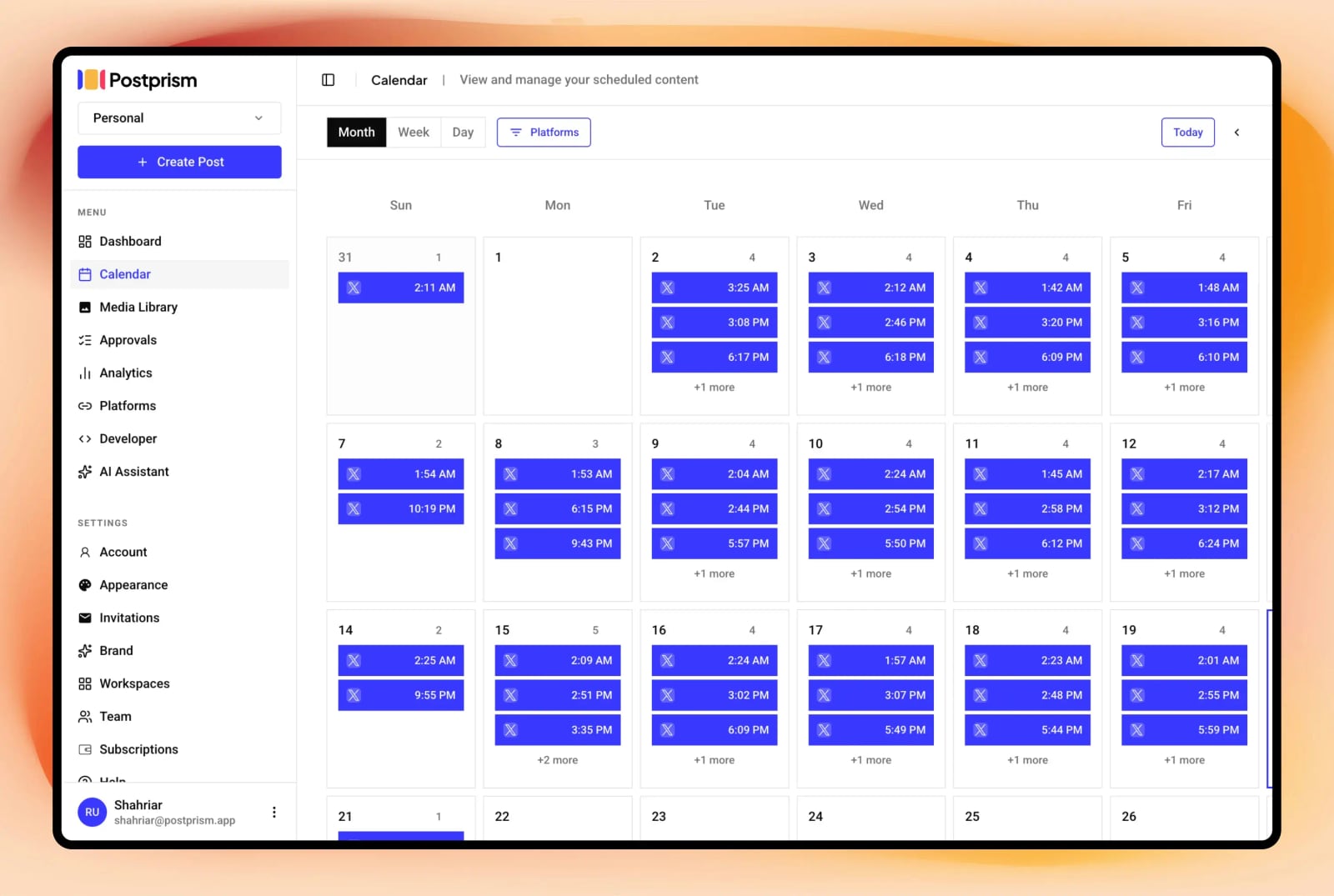
Postprism content calendar: plan, schedule, and publish across platforms from one view.
Setting up Postprism is straightforward. You create a workspace, connect social accounts via OAuth under Settings > Platforms, and start scheduling. The company claims setup takes under five minutes, which is realistic for a single user connecting a few accounts.
For agencies migrating from another tool, the process involves recreating your content schedule in Postprism's calendar. There is no direct import from most competitors, so you will need to manually rebuild queued posts or use CSV once that feature is available. This is a migration cost worth factoring in.
The interface is focused on scheduling and adaptation. It is less cluttered than enterprise suites, which is a plus for teams that mainly need to plan and publish.
Strengths and Limitations
Strengths:
- AI content adaptation across nine networks, with Brand Voice training.
- Flat workspace pricing that does not scale per seat or per account.
- Visual calendar and kanban pipeline for content planning.
- Team roles and approval workflows from the Freelancer plan.
- Supports Bluesky and Threads, which some competitors do not.
Limitations:
- CSV bulk scheduling is planned but not yet available.
- No CRM integrations or social listening features.
- Analytics are less advanced than enterprise tools.
- Newer platform with a smaller customer base and integration ecosystem.
- No free plan; trial requires a credit card.
Postprism vs. Alternatives: Decision Criteria
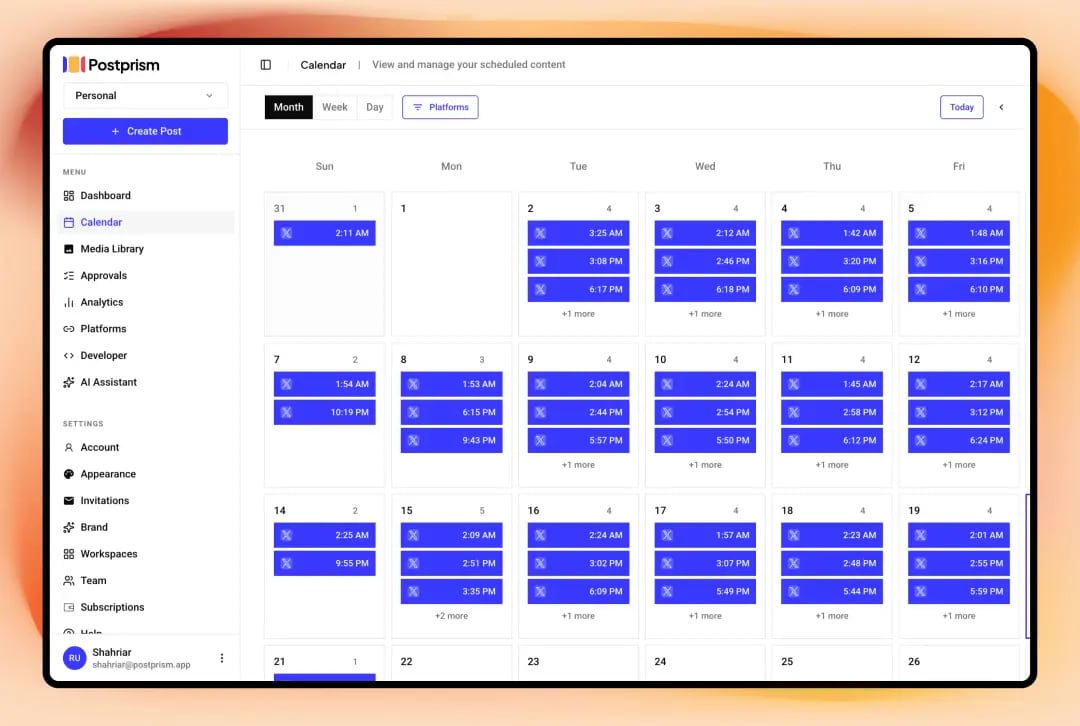
Postprism content calendar: plan, schedule, and publish across platforms from one view.
Choose Postprism if:
- You publish to three or more networks and want AI to handle per-platform rewrites.
- You run an agency with multiple clients and want flat pricing as you add accounts.
- You need approval workflows without paying per-seat enterprise prices.
- You value a visual calendar and kanban pipeline.
Consider alternatives if:
- You need CSV bulk scheduling today (SocialPilot has it).
- You require deep analytics, CRM integration, or social listening (Sprout Social is stronger).
- You want a free plan to test extensively (many competitors offer one).
- You mainly post to one or two networks (a simpler, cheaper tool may suffice).
For developers and SaaS teams looking for a social API rather than a scheduling UI, see our Ayrshare review. For comment intelligence and sentiment analysis, our Siftsy review covers that niche.
Related reading
- MediaWorkbench.ai Review 2026: Pricing, AI Features & Fit - Evidence-based MediaWorkbench.ai review: AI scheduling, analytics, pricing signals, setup, limitations, and who should use it in 2026.
Sources and further reading
- Postprism vs Sprout Social, AI Scheduling at a Fraction of the Cost | Postprism - Compare Postprism vs Sprout Social. Sprout Social offers enterprise analytics. Postprism delivers AI content adaptation at $49/month vs $249/seat.
- Postprism vs SocialPilot, AI Content Adaptation vs Bulk Scheduling | Postprism - Compare Postprism vs SocialPilot. See how AI-powered platform adaptation stacks up against SocialPilot's agency-focused bulk scheduling and per-account pricing.
- Prism shutting down - any good alternatives? : r/personalfinance - Dec 19, 2023 ... Following this post. Prism was the best thing I had found to ... Also, they have a free phone call with someone at Quicken to review ...
FAQ
Does Postprism have a free plan?
No. Postprism offers a 7-day free trial, but it requires a credit card. After the trial, you must choose a paid plan.
How many social networks does Postprism support?
Nine: LinkedIn, Twitter/X, Instagram, Facebook, TikTok, YouTube, Bluesky, Threads, and Pinterest.
Can Postprism handle multiple clients?
Yes. The Freelancer plan supports 2–3 client brands, and the Agency plan supports 5+ clients with multiple workspaces and team roles.
Is Postprism good for agencies?
It is a strong fit for small-to-mid agencies that need scheduling, AI adaptation, and approval workflows without per-seat pricing. It lacks some enterprise features like CRM integration and advanced reporting.
Does Postprism offer bulk scheduling?
CSV bulk scheduling is listed as a planned feature for Freelancer and Agency plans, but it is not yet released as of 2026.
How does Postprism pricing compare to Sprout Social?
Postprism's Agency plan is $99/month, while Sprout Social starts around $249 per seat per month. Postprism is significantly cheaper for small teams, but Sprout offers deeper analytics and enterprise features.
Conclusion
Postprism is a focused, affordable scheduling tool with a genuine differentiator: AI that adapts one post for nine networks. It is best suited to freelancers, social media managers, and small-to-mid agencies that publish across multiple platforms and want to avoid per-seat or per-account pricing. The lack of CSV bulk scheduling today and the absence of enterprise-grade analytics are real trade-offs, but for teams that prioritize cross-platform adaptation and flat pricing, Postprism is worth a serious look. Start with the trial, test the AI adaptation quality on your own brand voice, and decide from there.